Compare commits

24 Commits
Author SHA1 Message Date
molluskandClaude Opus 4.7 f8f8e9ab18 Release v0.2.0
Highlights since v0.1.0:
- Store Page button next to Play
- Opt-in store-price label with four format styles, 15-min in-memory cache
- Updated README and screenshot

Co-Authored-By: Claude Opus 4.7 <noreply@anthropic.com>
2026-05-09 19:55:32 -04:00
molluskandClaude Opus 4.7 e28646ad1a Bump pkgver to r40.7b5e777
Co-Authored-By: Claude Opus 4.7 <noreply@anthropic.com>
2026-05-09 19:52:16 -04:00
mollusk 7b5e777277 Merge branch 'feature/readme-store-features' 2026-05-09 19:51:55 -04:00
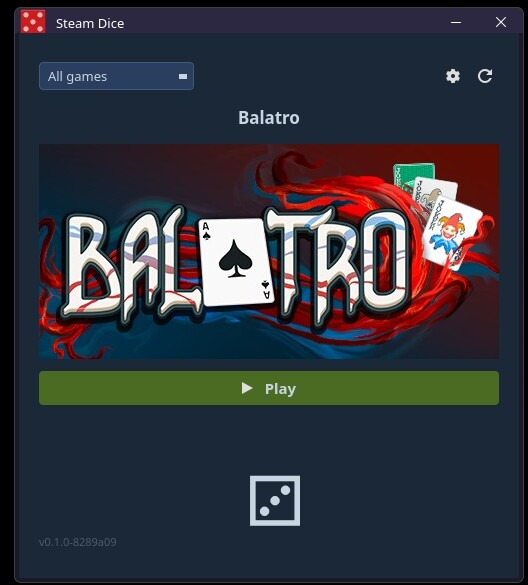
molluskandClaude Opus 4.7 a7db5c8bc0 Update README + screenshot for Store Page button and price label
Adds bullets covering the new Store Page action, opt-in store-price
label, and the settings entry that controls them. Refreshes the
screenshot to show the current layout (Balatro on sale, formatted
in full strike+sale+% style).

Co-Authored-By: Claude Opus 4.7 <noreply@anthropic.com>
2026-05-09 19:51:51 -04:00
molluskandClaude Opus 4.7 15ff3527e8 Bump pkgver to r37.052b6d4
Co-Authored-By: Claude Opus 4.7 <noreply@anthropic.com>
2026-05-09 19:48:37 -04:00
mollusk 052b6d43c5 Merge branch 'feature/store-price' 2026-05-09 19:48:13 -04:00
molluskandClaude Opus 4.7 47abb10d6e Add opt-in store price label
Settings checkbox (off by default) toggles a price label between the
title and the cover image. Format combo offers four styles
(final / final+%, strikethrough, full strike+sale+%). Prices come from
the public appdetails endpoint, cached in-memory for 15 minutes.
"Free" / "—" cover F2P / unavailable apps.

Co-Authored-By: Claude Opus 4.7 <noreply@anthropic.com>
2026-05-09 19:48:10 -04:00
molluskandClaude Opus 4.7 3b852d0f5a Bump pkgver to r34.3e84c3a
Co-Authored-By: Claude Opus 4.7 <noreply@anthropic.com>
2026-05-09 19:36:05 -04:00
mollusk 3e84c3a210 Merge branch 'feature/store-page-button' 2026-05-09 19:35:12 -04:00
molluskandClaude Opus 4.7 2221636e18 Add Store Page button next to Play
Opens https://store.steampowered.com/app/<appid>/ via xdg-open for
the currently rolled game. Toggles visibility in lockstep with Play.

Co-Authored-By: Claude Opus 4.7 <noreply@anthropic.com>
2026-05-09 19:35:10 -04:00
molluskandClaude Opus 4.7 b43eb11924 Use relative path for README screenshot
The previous absolute URL pointed at the Gitea instance and was
proxied by GitHub's camo image cache, which kept serving an old
copy after the screenshot was updated. A relative path lets each
forge (GitHub, Gitea) resolve and serve the image from its own
repo blob, bypassing camo.

Co-Authored-By: Claude Opus 4.7 <noreply@anthropic.com>
2026-05-08 21:17:18 -04:00
molluskandClaude Opus 4.7 a152c9b188 Bump pkgver to r30.4ba3aa0
Catches the cached pkgver up to the current HEAD so makepkg's
displayed version matches what the dynamic pkgver() function
would compute.

Co-Authored-By: Claude Opus 4.7 <noreply@anthropic.com>
2026-05-08 21:13:29 -04:00
mollusk 4ba3aa06a7 Merge branch 'feature/readme-update' 2026-05-08 21:11:19 -04:00
molluskandClaude Opus 4.7 29dfe43d3f Update README + screenshot for genre/tag/friend filters
The README still described the install-state filter as the only top-row
control. Bring it in line with what the app actually offers now: install
state, genre, multi-select tags (with search, AND'd), and multi-select
friends (intersection). Document the friends-filter prerequisites
(friend's profile privacy must expose friends list + game details).

Adds keyring and xdg-utils to the hard-dep list (already required at
runtime; previously omitted from the README) and python-steam as the
optional dep that unlocks instant genre + tag filtering via
appinfo.vdf. Replaces the Void Linux install hint with an Arch one
that mirrors what the PKGBUILD installs.

PKGBUILD optdepends wording updated alongside: it now reflects that
python-steam unlocks both genre AND tag filters, not just genre.

Screenshot replaced with one taken on the current build showing all
four filter controls.

Co-Authored-By: Claude Opus 4.7 <noreply@anthropic.com>
2026-05-08 21:11:06 -04:00
mollusk 89049ec970 Merge branch 'feature/multiselect-tags' 2026-05-08 20:56:13 -04:00
molluskandClaude Opus 4.7 c6c062bc50 Convert tag filter to multi-select with search
Replaces the single-select tag QComboBox with a TagsButton + TagsPopup
mirroring the friends pattern: a combo-styled button labelled "Tags (N) ▾"
opens a borderless popup containing a search input and a checkable list of
tags. Selecting multiple tags AND-filters games — a game must carry every
selected tag to survive — which makes it easy to narrow large libraries to
specific intersections (e.g. Roguelike + Co-op).

The search input is auto-focused on popup open and filters the list as the
user types, with a status line showing "N of M tag(s)". Selection state
survives search filtering and popup close/reopen.

The popup style and button style are renamed from FRIENDS_*_STYLE to
MULTISELECT_*_STYLE and reused by both FriendsPopup and TagsPopup; the
popup objectName moves from "FriendsPopup" to "MultiSelectPopup". The
TagsPopup adds a QLineEdit selector to the shared style.

Co-Authored-By: Claude Opus 4.7 <noreply@anthropic.com>
2026-05-08 20:56:10 -04:00
mollusk 76dc76a83b Merge branch 'feature/friends-filter' 2026-05-08 20:13:14 -04:00
molluskandClaude Opus 4.7 b812558def Add multi-select friends filter
Adds a fourth filter control next to install/genre/tag: a "Friends ▾" button
that opens a checkable popup of the user's Steam friends. Selected friends'
libraries are intersected with the user's so only games everyone owns survive,
making it easy to combine with genre/tag to find a category of game everyone
in the room can play.

Friend list (with display names) is fetched via GetFriendList +
GetPlayerSummaries and cached at ~/.cache/steam-dice/friends.json. Each
friend's owned-games set is fetched lazily the first time they're checked
and cached at ~/.cache/steam-dice/friend_games/<steamid>.json. The main
refresh button re-fetches selected friends alongside the user's library;
the popup's own refresh button re-pulls just the friend list.

While a selected friend's library is still loading, the dice button stays
disabled and the status line shows which friend(s) are pending. Settings
changes that switch the steam_id clear in-memory friends state so the
previous user's friends don't pollute the new account.

Window width grows 40px (500 -> 540) and combo width shrinks 115 -> 100 so
all four controls fit on a single row.

Co-Authored-By: Claude Opus 4.7 <noreply@anthropic.com>
2026-05-08 20:13:11 -04:00
mollusk 643715d0c6 Merge branch 'feature/store-tags' 2026-05-08 16:09:11 -04:00
molluskandClaude Opus 4.7 402df8434a Align filter combos via shared column geometry
The genre column hid its progress sub-label by default, so its effective
height was 28px while the filter and tag columns were 46px (combo +
sub-label). Qt's default vertical centering then dropped the genre combo
~9px below the others.

Use a single _combo_column() helper for all three filters, with fixed
115px width, fixed 28px combo height, and an always-present 14px sub-row
(progress label for genres, empty spacer for filter/tag). The progress
label now toggles its text instead of its visibility, preserving the
column's reserved space.

Co-Authored-By: Claude Opus 4.7 <noreply@anthropic.com>
2026-05-08 16:05:59 -04:00
molluskandClaude Opus 4.7 55c88ecd1f Add store-tag filter alongside genre filter
Steam's official genres list is coarse (~12 entries) and doesn't include
community-relevant categories like Roguelike, Soulslike, or Metroidvania —
those live in Steam's store tags. This adds a second combo box that filters
by store tag, AND'd with the genre filter.

Tag IDs in appinfo.vdf are translated via Steam's IStoreService/GetTagList
endpoint (~450 entries, fetched once on first use, cached at
~/.cache/steam-dice/tags.json). The genre cache file is replaced by
~/.cache/steam-dice/taxonomy.json, which stores both genres and tags per
appid as {"genres": [...], "tags": [...]}; the old genres.json is left in
place as harmless orphan data. Cache merge logic preserves non-empty
fields per appid so the API-fallback genre fetcher doesn't clobber tags
populated from appinfo.vdf.

Tags are appinfo.vdf-only — Steam's appdetails endpoint doesn't return
store_tags, so there's no API fallback. Without python-steam, the tag
combo stays empty and a tooltip-style dialog explains why.

Co-Authored-By: Claude Opus 4.7 <noreply@anthropic.com>
2026-05-08 15:55:18 -04:00
mollusk 77af32081d Merge branch 'feature/genre-filter'
Adds genre/category filter dropdown. Reads from Steam's local
appinfo.vdf for instant population, with rate-limited appdetails API
as fallback when local data is unavailable.
2026-05-08 15:31:29 -04:00
mollusk b5dc6fb547 Fix genre cache merge race when API thread runs alongside main thread
_save_genre_cache now reads the on-disk state and merges before writing,
so a concurrent writer can't shrink the cache. Likewise the API thread's
progress/done handlers now `update()` the in-memory cache instead of
replacing it wholesale.

Reachable only in the rare path where both the appinfo loader and the
API fetch thread run in the same session.
2026-05-08 15:31:24 -04:00
mollusk bb50d96999 Add genre filter using local appinfo.vdf with API fallback
Adds a second dropdown next to the install filter that lets the user
narrow rolls to a single Steam genre (RPG, Strategy, etc.).

Genre data is loaded from Steam's local appinfo.vdf cache via
python-steam (instant, no network). If that's unavailable or a game
isn't in the cache, falls back to a rate-limited background fetch of
appdetails?filters=genres, prompted via confirm dialog. Cached at
~/.cache/steam-dice/genres.json across runs.

python-steam declared as optdepends — app degrades gracefully to the
API path if missing.
2026-05-08 15:26:53 -04:00
4 changed files with 1378 additions and 27 deletions
+2 -1
View File
@@ -1,13 +1,14 @@
# Maintainer: Mollusk <silvernode@gmail.com>
pkgname=steam-dice-git
_pkgname=steam-dice
pkgver=r17.be764eb
pkgver=r41.e28646a
pkgrel=1
pkgdesc="A PyQt6 desktop app that picks a random game from your Steam library"
arch=('any')
url="https://github.com/silvernode/steam-dice"
license=('GPL-2.0-only')
depends=('python' 'python-pyqt6' 'python-requests' 'python-keyring' 'xdg-utils')
optdepends=('python-steam: instant genre + tag filters via Steam'\''s local appinfo.vdf cache (without it, genres fall back to the rate-limited Steam API and tag filtering is unavailable)')
makedepends=('git')
provides=("$_pkgname")
conflicts=("$_pkgname")
+39 -11
View File
@@ -2,15 +2,21 @@
A small desktop app that picks a random game from your Steam library and lets you launch it directly. Stop staring at your backlog — let the dice decide.
![Steam Dice screenshot](https://gitbutter.xyz/mollusk/steam-dice/raw/branch/main/screenshot.jpg)
![Steam Dice screenshot](screenshot.jpg)
## Features
- Rolls a random game from your Steam library and displays its header art
- **Installed / Not installed / All** filter so you can limit rolls to games you can actually play right now
- Combinable filters in the top row, all AND'd together:
- **Install state** — All / Installed / Not installed, to limit rolls to games you can actually play right now
- **Genre** — official Steam genre (Action, Strategy, RPG, …)
- **Tags** — multi-select popup with a search box; a game must carry every selected tag to survive
- **Friends** — multi-select popup; picks games every selected friend also owns, perfect for "what should we play tonight?"
- **Play** button launches the selected game immediately via Steam
- Settings dialog for your API key and Steam ID, persisted across sessions
- Refresh button with a 60-second cooldown to avoid hammering the Steam API
- **Store Page** button opens the rolled game's Steam store page in your browser — handy for checking screenshots, reviews, or gifting it to a friend
- **Optional store-price label** (off by default) shows the current store price under the title, with a configurable format (final only, with discount %, strikethrough original, or full strike + sale + %) — useful for spotting sales when picking a gift
- Settings dialog for your API key and Steam ID, persisted across sessions (API key kept in your system keyring)
- Refresh button with a 60-second cooldown to avoid hammering the Steam API; refreshing also re-fetches selected friends' libraries
- Clean Steam-themed dark UI built with PyQt6
- Wayland-native with X11 fallback
@@ -19,18 +25,26 @@ A small desktop app that picks a random game from your Steam library and lets yo
- Python 3.8+
- [PyQt6](https://pypi.org/project/PyQt6/)
- [requests](https://pypi.org/project/requests/)
- [keyring](https://pypi.org/project/keyring/) — used to store your Steam API key in the system keyring
- `xdg-utils` — used to launch games via `steam://` URLs
- Steam installed locally (for the "Installed" filter and launching games)
Install dependencies with pip:
**Optional:** [python-steam](https://pypi.org/project/steam/) enables instant genre **and** tag filters by reading Steam's local `appinfo.vdf` cache. Without it, genres fall back to a rate-limited Steam Store API fetch and tag filtering is unavailable (no API fallback exists for tags).
Install with pip:
```bash
pip install PyQt6 requests
pip install PyQt6 requests keyring
# optional, for instant genre + tag filters
pip install steam
```
Or with your distro's package manager, e.g. on Void Linux:
Or on Arch (mirrors what the [PKGBUILD](PKGBUILD) installs):
```bash
xbps-install python3-PyQt6 python3-requests
pacman -S python-pyqt6 python-requests python-keyring xdg-utils
# optional
pacman -S python-steam
```
## Setup
@@ -66,10 +80,24 @@ On first launch the settings dialog will open automatically. Enter your API key
Once loaded:
- Click the **dice** button to roll a random game
- Use the **filter dropdown** to restrict rolls to installed or uninstalled games
- Combine the four filter controls in the top row to narrow the pool:
- **All games / Installed / Not installed**
- **All genres** dropdown — pick one Steam genre
- **Tags ▾** — opens a popup with a search box and checkboxes; selected tags are AND'd, so a game must carry every checked tag
- **Friends ▾** — opens a popup listing your Steam friends; check any number to keep only games every selected friend also owns
- Click **Play** to launch the rolled game via Steam
- Click the **refresh** button (⟳) to re-fetch your library (60s cooldown applies)
- Click the **settings** button (⚙) to update your credentials at any time
- Click **Store Page** to open the rolled game's Steam store page in your browser
- Click ⟳ to re-fetch your library (60s cooldown applies); selected friends' libraries refresh too
- Click ⚙ to update your credentials, toggle the store-price label, or change its format
### Friends filter prerequisites
For a friend to appear and contribute to filtering, the **friend's** Steam profile privacy must allow:
- Friends list visibility (so you can see them in the popup at all)
- Game details visibility (so their owned-game list is fetchable)
Friends with private game details show as `(private / 0 games)` in the popup and never narrow the result.
## License
BIN
View File
Binary file not shown.

Before

Width:  |  Height:  |  Size: 48 KiB

After

Width:  |  Height:  |  Size: 60 KiB

+1337 -15
View File
File diff suppressed because it is too large Load Diff