
 molluskandClaude Opus 4.7
b812558def
molluskandClaude Opus 4.7
b812558def
Adds a fourth filter control next to install/genre/tag: a "Friends ▾" button
that opens a checkable popup of the user's Steam friends. Selected friends'
libraries are intersected with the user's so only games everyone owns survive,
making it easy to combine with genre/tag to find a category of game everyone
in the room can play.

Friend list (with display names) is fetched via GetFriendList +
GetPlayerSummaries and cached at ~/.cache/steam-dice/friends.json. Each
friend's owned-games set is fetched lazily the first time they're checked
and cached at ~/.cache/steam-dice/friend_games/<steamid>.json. The main
refresh button re-fetches selected friends alongside the user's library;
the popup's own refresh button re-pulls just the friend list.

While a selected friend's library is still loading, the dice button stays
disabled and the status line shows which friend(s) are pending. Settings
changes that switch the steam_id clear in-memory friends state so the
previous user's friends don't pollute the new account.

Window width grows 40px (500 -> 540) and combo width shrinks 115 -> 100 so
all four controls fit on a single row.

Co-Authored-By: Claude Opus 4.7 <noreply@anthropic.com>


Steam Dice
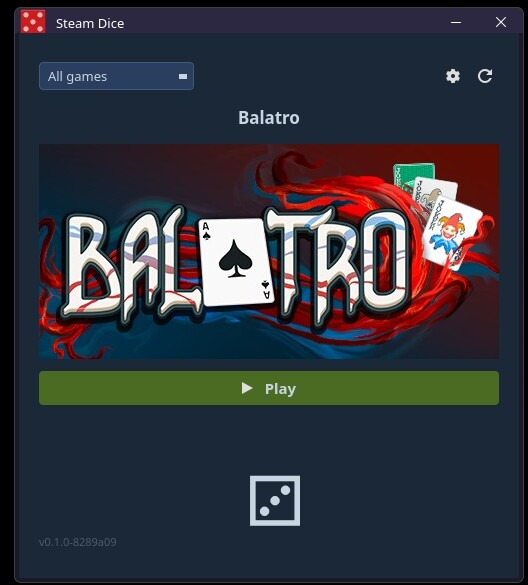
A small desktop app that picks a random game from your Steam library and lets you launch it directly. Stop staring at your backlog — let the dice decide.
Features
- Rolls a random game from your Steam library and displays its header art
- Installed / Not installed / All filter so you can limit rolls to games you can actually play right now
- Play button launches the selected game immediately via Steam
- Settings dialog for your API key and Steam ID, persisted across sessions
- Refresh button with a 60-second cooldown to avoid hammering the Steam API
- Clean Steam-themed dark UI built with PyQt6
- Wayland-native with X11 fallback
Requirements
Install dependencies with pip:
pip install PyQt6 requests
Or with your distro's package manager, e.g. on Void Linux:
xbps-install python3-PyQt6 python3-requests
Setup
1. Steam API Key
You need a free Steam Web API key to fetch your library.
- Go to steamcommunity.com/dev/apikey and log in.
- Enter any domain name (e.g.
localhost) and click Register. - Copy the 32-character key shown on the page.
2. Steam ID (64-bit)
Your Steam ID is the 17-digit number in your profile URL:
steamcommunity.com/profiles/76561198000000000
                             ^^^^^^^^^^^^^^^^^
                             this is your ID
If you use a custom profile URL (e.g. steamcommunity.com/id/yourname), look up your numeric ID at steamid.io.
Usage
python steam_dice.py
On first launch the settings dialog will open automatically. Enter your API key and Steam ID, then click Save. Your library loads in the background.
Once loaded:
- Click the dice button to roll a random game
- Use the filter dropdown to restrict rolls to installed or uninstalled games
- Click Play to launch the rolled game via Steam
- Click the refresh button (⟳) to re-fetch your library (60s cooldown applies)
- Click the settings button (⚙) to update your credentials at any time
License
Steam Dice is free software released under the GNU General Public License v2.0.