 mollusk
29dfe43d3f
mollusk
29dfe43d3f
The README still described the install-state filter as the only top-row
control. Bring it in line with what the app actually offers now: install
state, genre, multi-select tags (with search, AND'd), and multi-select
friends (intersection). Document the friends-filter prerequisites
(friend's profile privacy must expose friends list + game details).

Adds keyring and xdg-utils to the hard-dep list (already required at
runtime; previously omitted from the README) and python-steam as the
optional dep that unlocks instant genre + tag filtering via
appinfo.vdf. Replaces the Void Linux install hint with an Arch one
that mirrors what the PKGBUILD installs.

PKGBUILD optdepends wording updated alongside: it now reflects that
python-steam unlocks both genre AND tag filters, not just genre.

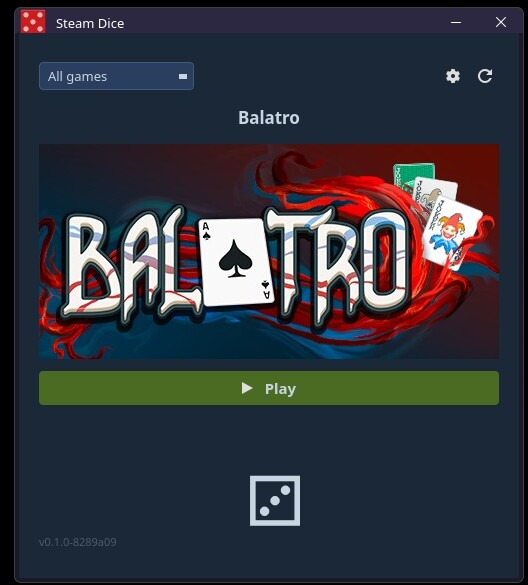
Screenshot replaced with one taken on the current build showing all
four filter controls.

Co-Authored-By: Claude Opus 4.7 <noreply@anthropic.com>
102 lines
4.1 KiB
Markdown
102 lines
4.1 KiB
Markdown
# Steam Dice
|
|
|
|
A small desktop app that picks a random game from your Steam library and lets you launch it directly. Stop staring at your backlog — let the dice decide.
|
|
|
|
|
|
|
|
## Features
|
|
|
|
- Rolls a random game from your Steam library and displays its header art
|
|
- Combinable filters in the top row, all AND'd together:
|
|
- **Install state** — All / Installed / Not installed, to limit rolls to games you can actually play right now
|
|
- **Genre** — official Steam genre (Action, Strategy, RPG, …)
|
|
- **Tags** — multi-select popup with a search box; a game must carry every selected tag to survive
|
|
- **Friends** — multi-select popup; picks games every selected friend also owns, perfect for "what should we play tonight?"
|
|
- **Play** button launches the selected game immediately via Steam
|
|
- Settings dialog for your API key and Steam ID, persisted across sessions (API key kept in your system keyring)
|
|
- Refresh button with a 60-second cooldown to avoid hammering the Steam API; refreshing also re-fetches selected friends' libraries
|
|
- Clean Steam-themed dark UI built with PyQt6
|
|
- Wayland-native with X11 fallback
|
|
|
|
## Requirements
|
|
|
|
- Python 3.8+
|
|
- [PyQt6](https://pypi.org/project/PyQt6/)
|
|
- [requests](https://pypi.org/project/requests/)
|
|
- [keyring](https://pypi.org/project/keyring/) — used to store your Steam API key in the system keyring
|
|
- `xdg-utils` — used to launch games via `steam://` URLs
|
|
- Steam installed locally (for the "Installed" filter and launching games)
|
|
|
|
**Optional:** [python-steam](https://pypi.org/project/steam/) enables instant genre **and** tag filters by reading Steam's local `appinfo.vdf` cache. Without it, genres fall back to a rate-limited Steam Store API fetch and tag filtering is unavailable (no API fallback exists for tags).
|
|
|
|
Install with pip:
|
|
|
|
```bash
|
|
pip install PyQt6 requests keyring
|
|
# optional, for instant genre + tag filters
|
|
pip install steam
|
|
```
|
|
|
|
Or on Arch (mirrors what the [PKGBUILD](PKGBUILD) installs):
|
|
|
|
```bash
|
|
pacman -S python-pyqt6 python-requests python-keyring xdg-utils
|
|
# optional
|
|
pacman -S python-steam
|
|
```
|
|
|
|
## Setup
|
|
|
|
### 1. Steam API Key
|
|
|
|
You need a free Steam Web API key to fetch your library.
|
|
|
|
1. Go to [steamcommunity.com/dev/apikey](https://steamcommunity.com/dev/apikey) and log in.
|
|
2. Enter any domain name (e.g. `localhost`) and click **Register**.
|
|
3. Copy the 32-character key shown on the page.
|
|
|
|
### 2. Steam ID (64-bit)
|
|
|
|
Your Steam ID is the 17-digit number in your profile URL:
|
|
|
|
```
|
|
steamcommunity.com/profiles/76561198000000000
|
|
^^^^^^^^^^^^^^^^^
|
|
this is your ID
|
|
```
|
|
|
|
If you use a custom profile URL (e.g. `steamcommunity.com/id/yourname`), look up your numeric ID at [steamid.io](https://steamid.io).
|
|
|
|
## Usage
|
|
|
|
```bash
|
|
python steam_dice.py
|
|
```
|
|
|
|
On first launch the settings dialog will open automatically. Enter your API key and Steam ID, then click **Save**. Your library loads in the background.
|
|
|
|
Once loaded:
|
|
|
|
- Click the **dice** button to roll a random game
|
|
- Combine the four filter controls in the top row to narrow the pool:
|
|
- **All games / Installed / Not installed**
|
|
- **All genres** dropdown — pick one Steam genre
|
|
- **Tags ▾** — opens a popup with a search box and checkboxes; selected tags are AND'd, so a game must carry every checked tag
|
|
- **Friends ▾** — opens a popup listing your Steam friends; check any number to keep only games every selected friend also owns
|
|
- Click **Play** to launch the rolled game via Steam
|
|
- Click ⟳ to re-fetch your library (60s cooldown applies); selected friends' libraries refresh too
|
|
- Click ⚙ to update your credentials at any time
|
|
|
|
### Friends filter prerequisites
|
|
|
|
For a friend to appear and contribute to filtering, the **friend's** Steam profile privacy must allow:
|
|
|
|
- Friends list visibility (so you can see them in the popup at all)
|
|
- Game details visibility (so their owned-game list is fetchable)
|
|
|
|
Friends with private game details show as `(private / 0 games)` in the popup and never narrow the result.
|
|
|
|
## License
|
|
|
|
Steam Dice is free software released under the [GNU General Public License v2.0](LICENSE).
|